Rosie'sHQ is in Founders Testing — 3 months free with code — code FOUNDER26
The Ultimate Operating System for Your Homeschool.
Parents plan lessons, kids submit work on their tablet, and Rosie'sHQ handles the grades, the hours, and the state-compliance paperwork — all automatically. Everything a homeschool family needs to run a professional, audit-ready school year.
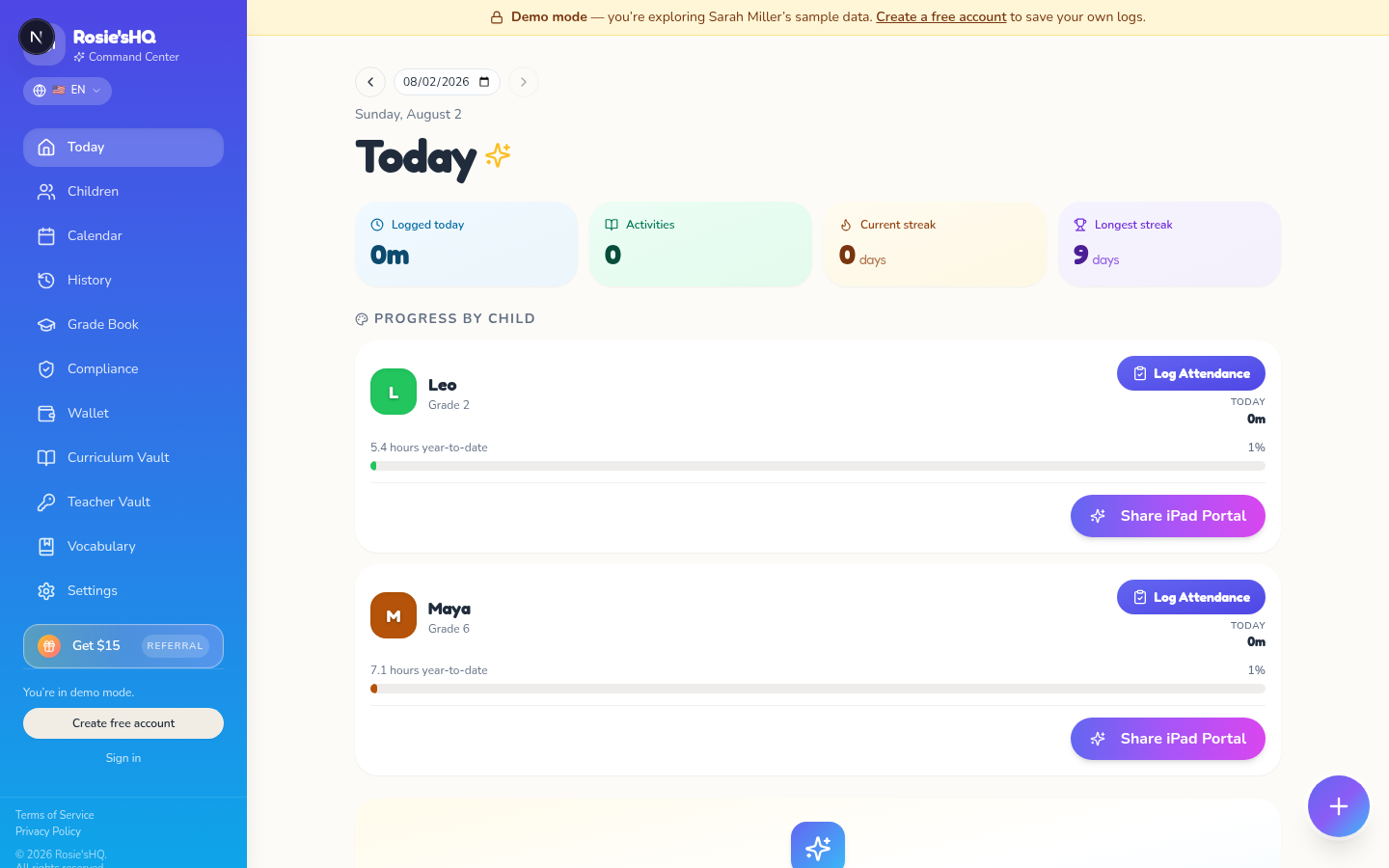
Plan → Teach → Track → Report.
The same daily log powers every tool. No duplicate entry, no year-end reconstruction.
Schedule the year in one sitting with recurring lesson templates.
Log lessons, attendance, and student work in 30 seconds a day.
Live progress against your state’s required day and hour totals.
Notice of Intent, year-end portfolio, and college-ready transcript.
Set it up in a Sunday afternoon.
Three steps between kitchen-table chaos and a professionally-run homeschool.
Add your children & subjects
Enter each child, pick their grade, and drag in the subjects they'll take. Rosie'sHQ auto-loads your state's compliance requirements so you're audit-ready from day one.
Share the magic iPad link
Tap 'Share Child Portal' and your kid sees their own giant-button dashboard. They tap through quests, mark worksheets, and submit their work — no login needed.
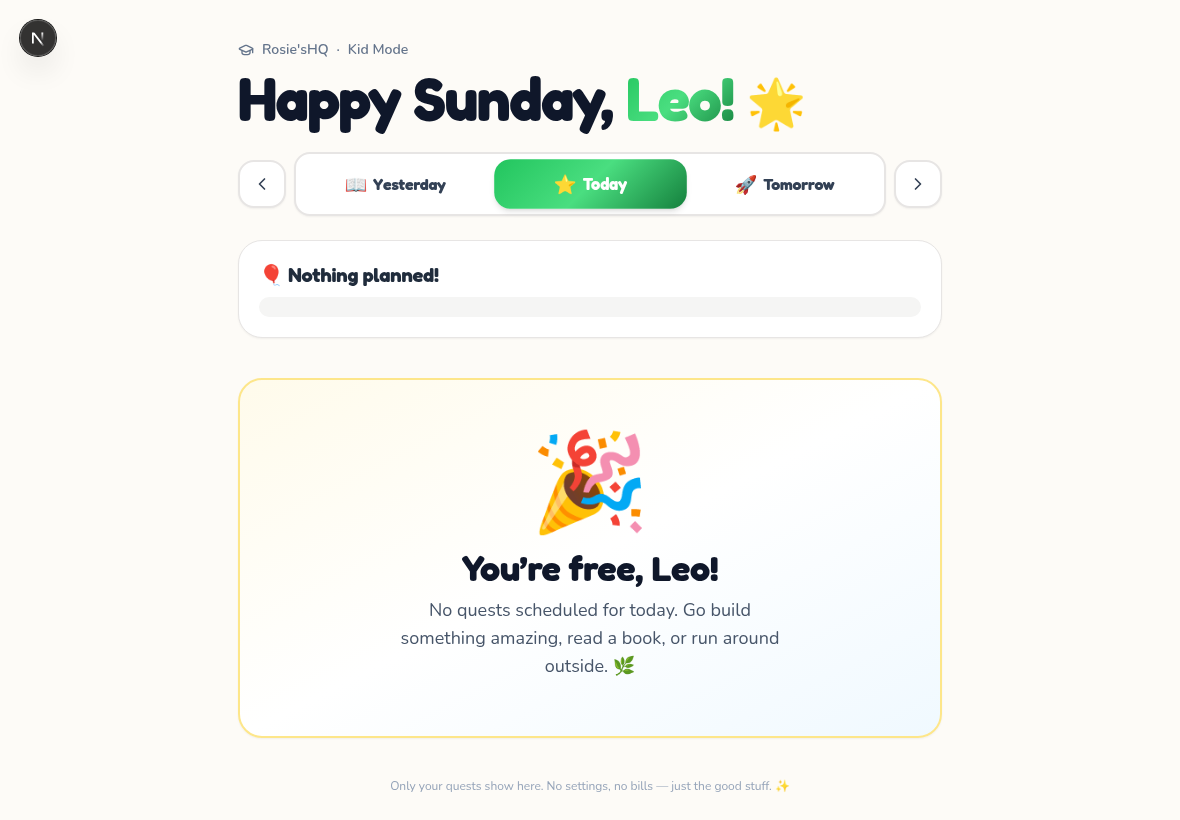
Approve once, everything updates
One-tap approvals from the bell icon. Grades land in the grade book. Hours land on the compliance page. Everything is audit-ready — and you get your evenings back.
Run your homeschool like a pro.
Five tightly integrated systems that turn kitchen-table homeschooling into a professional, audit-ready operation.
One parent dashboard. One kid tablet.
A polished command center for you, and a giant-button iPad view for them. Kids see their own quests, tap through worksheets, and submit their work — everything routes back to the parent for review.
Grades & transcripts, automatic.
Percentages, mastery scale, or pass/fail — pick the mode per subject. Approve a lesson and the grade lands in the book automatically. Transcripts export as college-ready PDFs.
State-compliant hours & days, tracked live.
Rosie'sHQ knows every US state’s mandated hours, required subjects, and notice-of-intent formats. See your compliance % update in real time. Generate a state-shaped attendance PDF in one click.
One-click approvals across every child.
A global bell shows every submission waiting for you. Grade with a modal or tap the green ✔ for a Quick Log — the notification vanishes, the calendar turns green, and history updates instantly.
PDFs & workbooks, safely in the cloud.
Upload once, attach to any lesson, and stream to the kid’s tablet with a signed short-lived URL. Their markup lands right back on the parent’s desk, flattened into a permanent record.
Every minute counted — without spreadsheets.
Whether your state counts hours or days, we do the arithmetic. Auto-log from any approved lesson, override with a tap, and export the ledger any auditor would love.
One flat price. Cancel anytime.
$30/month gets your whole family everything — no feature tiers, no upsells.
Pay as you go. Cancel anytime — no lock-in, no long commitments.
- 3 children included · $7/mo per extra kid
- 50-state compliance PDFs (NOI, Portfolio, Transcript)
- Smart lesson-planning co-pilot
- Curriculum + Teacher Vault (PDF storage)
- Wallet with instant receipt scanning
- Weekly + monthly parent digest emails
Save $60/year (about 17% off). Same everything, one clean charge, cancel anytime.
- 3 children included · $7/mo per extra kid
- 50-state compliance PDFs (NOI, Portfolio, Transcript)
- Smart lesson-planning co-pilot
- Curriculum + Teacher Vault (PDF storage)
- Wallet with instant receipt scanning
- Weekly + monthly parent digest emails
Questions we hear a lot.
What about my kid’s privacy?
Can I switch back to what I was using?
How many kids can I add?
Do you support IEPs and accommodations?
May I cancel anytime?
Rosie’sHQ was designed and built for my personal use only. After using the platform, I realized that other parents may have been struggling with the same issues I was, such as setting a schedule, having a way to keep attendance, and storing all the documents she was filling out.
I actually named Rosie’sHQ after my daughter, Rose. HQ stands for headquarters. The platform is designed to use as little or as many features as you would like. I hope that you will find this tool as useful as it was designed to be.
Rosie’sHQ is currently in Founders Testing right now, so if you run into any errors or have a great idea you think would be a beneficial feature, please share them with me. I personally view and respond to each email. I want to make this platform the one-stop place for all your homeschooling needs. customerservice@rosieshq.com.
🎁 Founders offerUse code FOUNDER26 at signup to unlock 3 months of Rosie’sHQ Pro completely free as one of our limited Founders Testing members.
Thank you,
— Charles
Give your homeschool a real operating system.
$30/mo. Cancel anytime. Every feature above is included on day one.
Complete referenceEverything Rosie’sHQ tracks for homeschool families.
Attendance · Lesson logs · State compliance PDFs · Grades · IEP goals · Portfolios · Schedules · Curriculum vault · 50-state rules · Show all 40+ →
Everything Rosie’sHQ tracks for homeschool families.
Attendance · Lesson logs · State compliance PDFs · Grades · IEP goals · Portfolios · Schedules · Curriculum vault · 50-state rules · Show all 40+ →
Rosie’sHQ is a homeschool tracker, planner, and compliance system built for families in all 50 U.S. states. It covers every kind of homeschooling — classical, Charlotte Mason, unit studies, unschooling, eclectic, roadschooling, and dual-enrollment. Whether you’re logging your first year or preparing a high-school transcript, here’s the complete list of what the app handles.
Daily tracking & logs
- Homeschool attendance tracker (180-day calendars & hour states)
- Daily lesson log & homeschool logbook
- Reading log, math minutes, and read-aloud tracker
- Homeschool hours tracker (900-hour, 990-hour, 1,000-hour states)
- Field trip & co-op activity log
- Physical education & extracurricular tracker
- Nature study & outdoor learning journal
- Music, art, and foreign language logs
- Multi-child homeschool tracking (unlimited children)
- Sibling activity linking (one lesson, many kids)
Planning & scheduling
- Homeschool curriculum planner & scheduler
- Weekly, daily, and monthly calendar views (24-hour timeline)
- Recurring lesson templates (daily, weekly, monthly)
- Google Calendar & Apple Calendar sync
- Homeschool block schedule & loop schedule builder
- Term / semester planner for high-school credits
- Activity reminders (10 min before, 1 hour before, 1 day before)
- Location-aware events (co-op room, library, kitchen table)
- Custom event support (birthdays, appointments, field trips)
- Reusable activity templates library
State compliance & legal reporting
- All 50 states + Washington, D.C. rules
- 1-Click Notice of Intent (NOI) PDF generator
- Individualized Home Instruction Plan (IHIP) — New York
- Homeschool affidavit generator (Pennsylvania Act 169, California PSA, Texas)
- Annual portfolio review PDF (Pennsylvania, Florida, Ohio, New York)
- Quarterly progress report generator
- Umbrella school / cover school reporting
- Church school reporting (Tennessee)
- Charter school & ISP report exports
- Statute references & last-verified dates on every state page
Explore state-by-state guides: homeschool laws for every U.S. state.
Grades, portfolios & transcripts
- Homeschool grade book & report card generator
- Year-end portfolio builder
- Homeschool high school transcript maker
- GPA calculator (weighted & unweighted)
- College application-ready course catalogue
- Standardized test result tracker (Iowa, Stanford, CAT, ITBS)
- Digital worksheet & answer sheet grading
- Rubric-based mastery scoring
- Approve & Grade workflow (parent reviews kid’s work)
- Automatic minute-to-credit conversion for Carnegie units
Special needs, IEP & accommodations
- IEP goal tracking for homeschoolers
- 504 plan & accommodation log
- Neurodivergent-friendly homeschool tools (ADHD, autism, dyslexia)
- Progress notes for private neuropsych evaluations
- Sensory break & movement-log support
- Adaptive assignment durations per child
- Speech, occupational, and physical therapy session logs
- Behavioral / social-emotional learning tracker
- Reading level & fluency tracker (Lexile / Fountas & Pinnell)
- Accessibility settings for kid portal (fonts, contrast, dyslexic mode)
Curriculum vault & file storage
- Worksheet library with per-child tagging
- PDF, image, Word, PowerPoint, Excel, audio, and video uploads
- Handwritten work capture (kid draws directly on tablet)
- Digital answer sheet builder
- Answer key + auto-grading of multiple choice
- Kid tablet portal (secure magic-link, no kid sign-in)
- Assignment mark-up & annotation tools
- YouTube / Vimeo lesson embedding (kid-safe, no ads, no comments)
- Photo evidence attachments on daily logs
- Vault search across every stored file
Family access & collaboration
- Multi-parent shared workspaces
- Co-parent read/write access
- Tutor & grandparent invite links
- Homeschool co-op leader admin views
- Shared calendar for large families
- Referral rewards ($15 credit per friend)
- Parent-to-kid activity assignment
- Kid completion checkbox on tablet portal
- Read every one — parent-only feedback loop
- Role-scoped data visibility (tutors see less than owners)
Homeschool methods & approaches
- Classical homeschooling (Trivium: grammar, logic, rhetoric)
- Charlotte Mason (narration, nature study, living books)
- Unit studies & thematic learning
- Waldorf-inspired homeschooling
- Montessori-at-home tracking
- Unschooling / interest-led / delight-directed
- Eclectic homeschooling (mix of methods)
- Roadschooling & worldschooling (travelling families)
- Deschooling logs for new-to-homeschool families
- Faith-based & secular curriculum both supported
Who Rosie’sHQ is for
- First-year homeschool families
- Homeschool tracker for beginners
- Large families (4+ kids) with sibling deduplication
- Working homeschool parents needing quick logs
- Homeschool tracker for high school & transcripts
- Homeschool parents of neurodivergent or 2e children
- Grandparent / relative caregivers
- Homeschool co-op & hybrid-school administrators
- Roadschool & RV-schooling families
- Military families PCS-ing across state lines
Have a use case that’s not on this list? Email customerservice@rosieshq.com — we’re actively adding features based on Founder feedback.